
One project. Many disciplines. Keep every review connected.
Project Intelligence · Use case 01

01 · Full BIM view, staggered portals · © BauLust e.V. / Google Maps 2025. Real surroundings from the Google Maps oblique aerial view; the BIM additions are conceptual illustrations.
The project goal
Keep six disciplines moving on one road project. On the Frankenschnellweg, roads, structures, ground, drainage, interfaces and landscape each send their own drawings for review.
- Disciplines
- 6
- Plans
- 2,701
- Shared model
- 1
 Full size
 Full size
What is standing in the way?
Every discipline reviews on its own. Comments end up in emails, signatures on paper and the model in another tool. Nobody sees which review is done and where it sits in the project.
The role: BIM Coordinator
Gherd Mike coordinates the Frankenschnellweg for GCE Holding. With Higherd, he reviews the drawing in the PDF viewer, signs with his comments and opens the same position in the shared model.

 Full size
See how every review stays connected.
Check your overview. Open your task. Comment and sign. See the workflow, the dashboard and the model update.
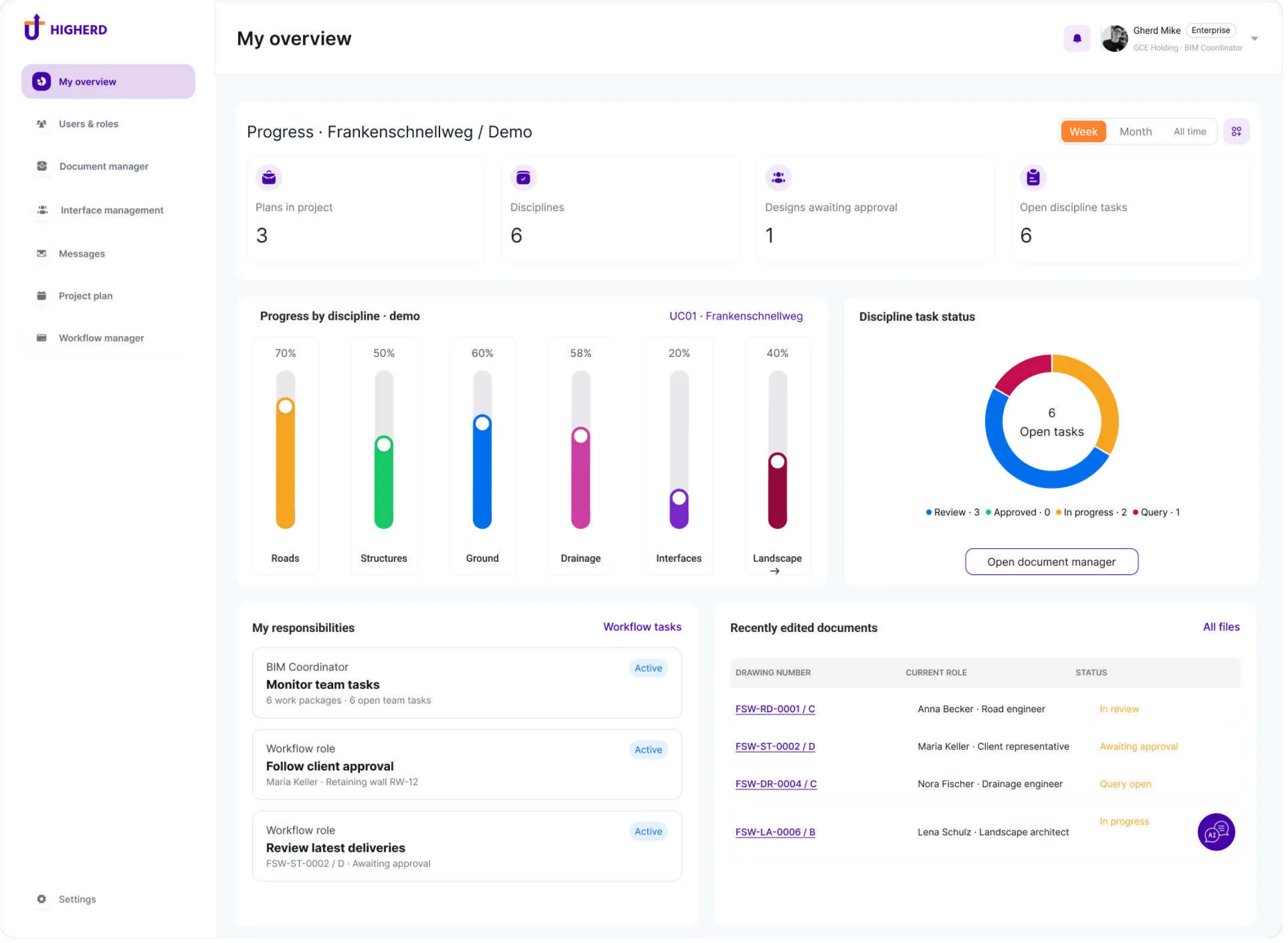
See what needs your review
BIM Coordinator · GCE Holding
Check progress by discipline, the open tasks and your responsibilities. Open Workflow tasks to start.
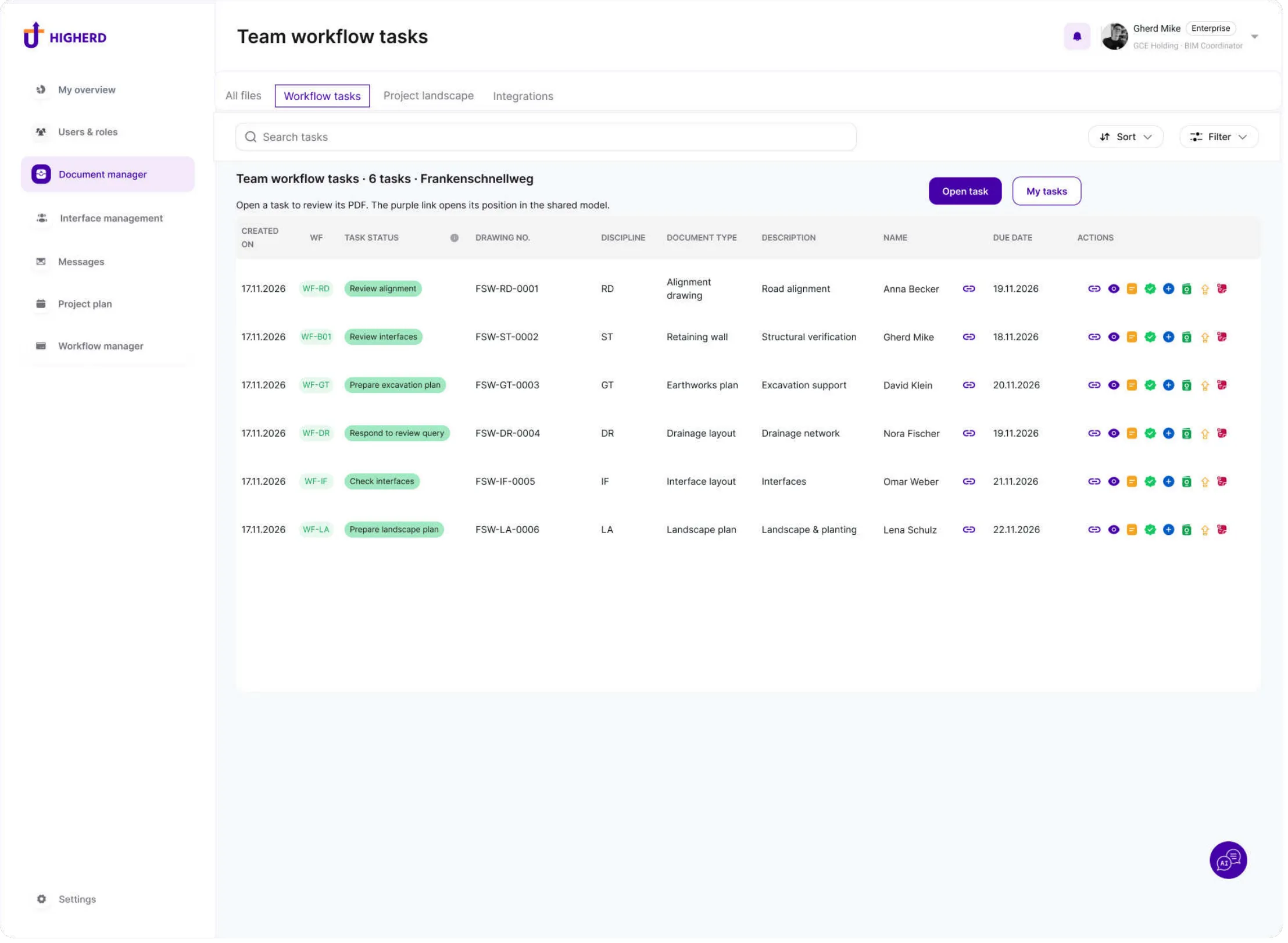
Your task, your team’s tasks
BIM Coordinator · GCE Holding
Switch between your tasks and the team’s. Use the actions menu on a row, or the purple link to open its position in the shared model.
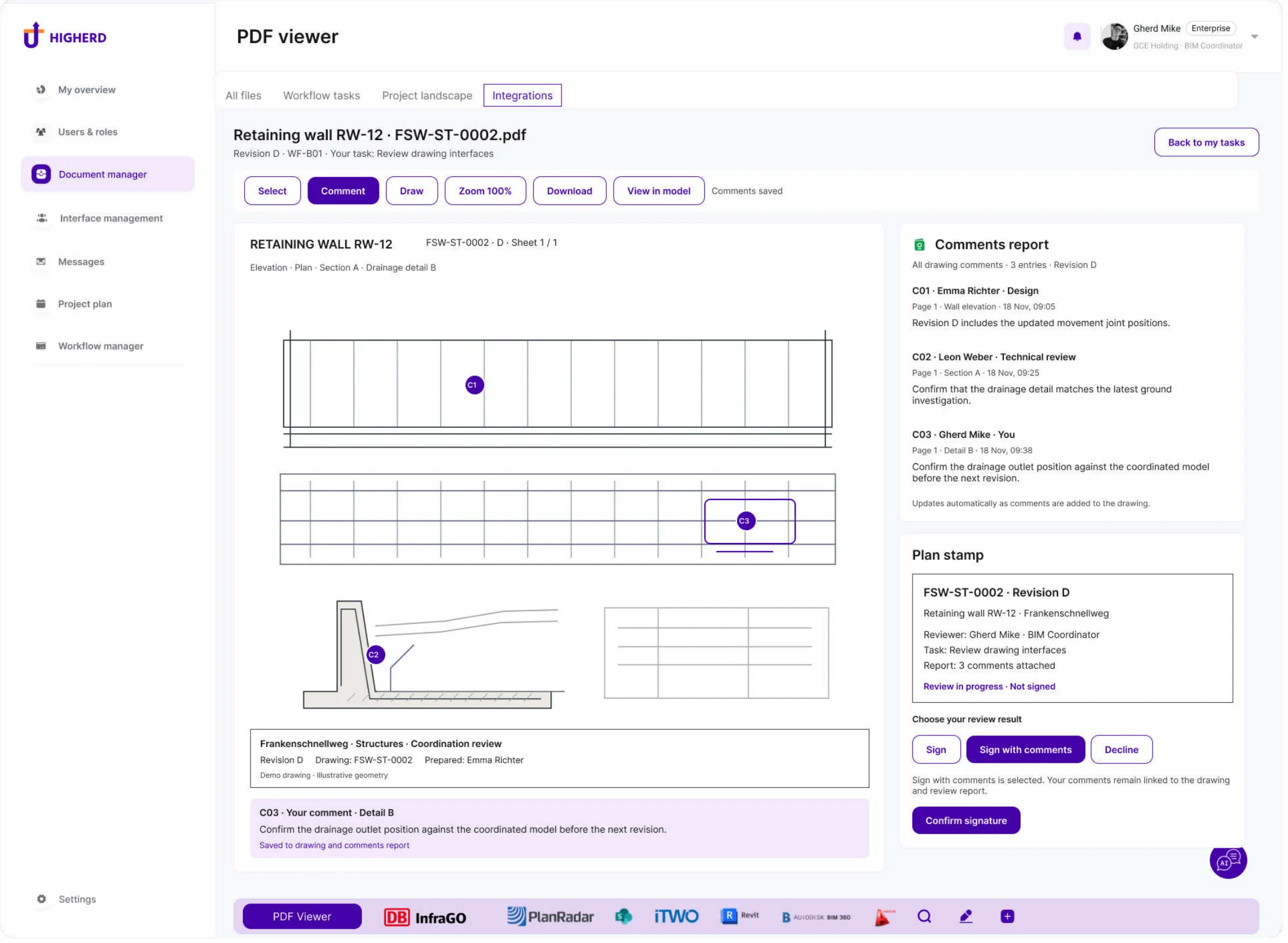
Comment and sign in one place
BIM Coordinator · GCE Holding
Save your comment on Detail B. The comments report updates. Choose Sign with comments in the plan stamp and confirm.
Open the same position in the model
BIM Coordinator · GCE Holding
InfraWorks and Revit open inside Integrations. Check the family attributes and preview a Dynamo check. Higherd links the tools; the model stays in its own app.
The result stays with the document
BIM Coordinator · GCE Holding
After signing, the drawing shows its new status. Open a document to see its comments, signature and history.
See where the review sits in the workflow
BIM Coordinator · GCE Holding
Your interfaces review moves the drawing to the next step. Technical reviews and client approval stay with their roles.
Set up the model connection
BIM Coordinator · GCE Holding
Choose the project, check the model characteristics and open a source file in Integrations. Each project keeps its own model.
Gherd Mike signs his own review task. Signing does not change the approval roles of the other participants. All data in this demo is illustrative.
Six disciplines. One connected review.
Each comment, signature and model position stays linked to its document.
Disciplines
Roads, structures, ground, drainage, interfaces and landscape.
Plans
Each document keeps its own revision history.
Comments
Linked to the drawing and the review report.
Shared model
Every task opens its saved position.
Less searching. More reviewing.
Before Higherd
- Comments spread across emails
- Signatures outside the workflow
- Search the model for the position
- Update status by hand
- Ask who needs to act next
With Higherd
- Comments linked to the drawing
- Sign in the plan stamp
- Open the saved model position
- Tasks and dashboard update
- Higherd Assistant tells the next step
Illustrative demo. Formal approvals remain with the responsible reviewers. Models stay in their own applications.
Connected Higherd solution
Check it out...
Project Management
Signature and Plan Process Management
Keep document preparation, review and approval connected.
For more informationYour review is signed.
Keep the next step moving.
What is slowing your project down?
Show us the documents and requirements. Let’s discuss how Higherd can help.
Features
- Enterprise-grade project management
- Real-time project intelligence
- Workforce planning and talent matching
- Integrations with the tools your teams already use
Trusted by teams like
- PwC
- Max Bögl
- TransnetBW
- Deutsche Bahn
- Alstom
- BEW
- Die Autobahn
- Hays
Thank you!
We've received your message and will get back to you shortly.